

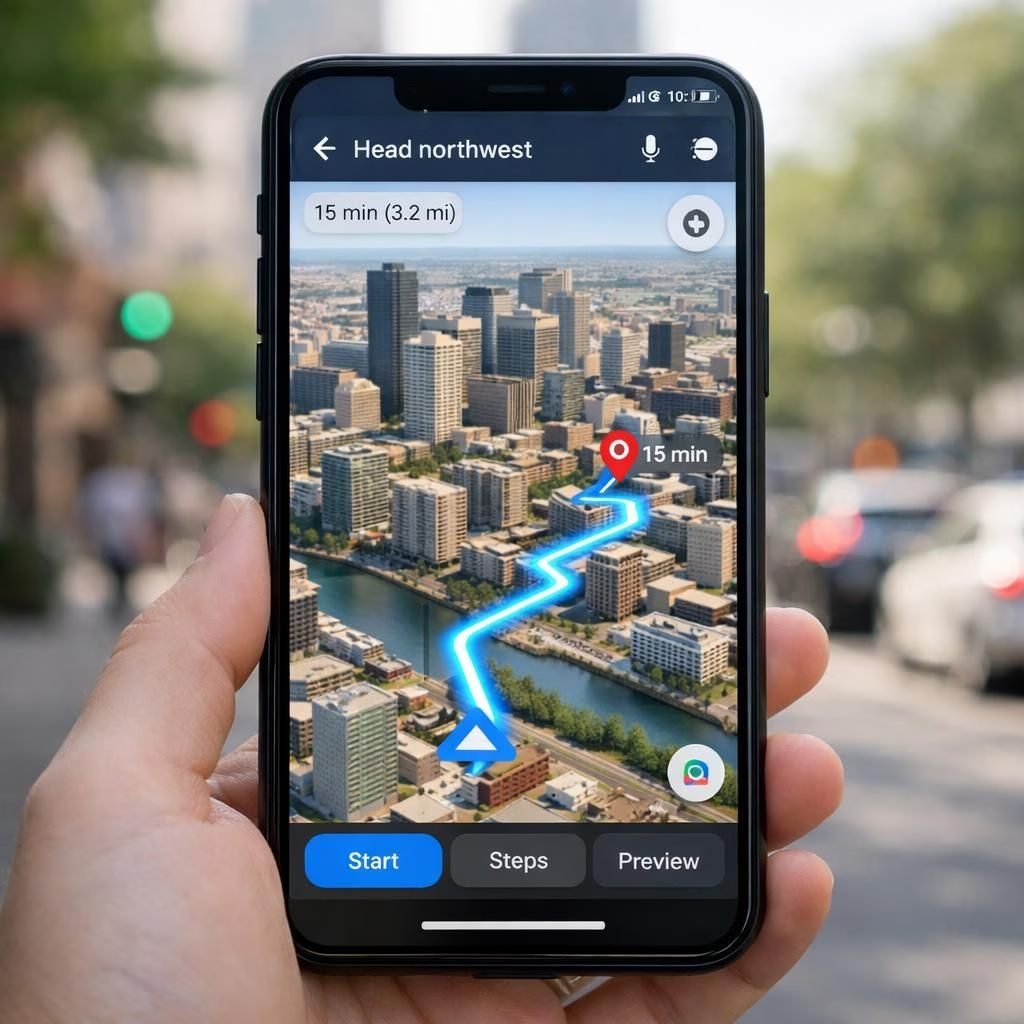
Maps is getting a glossy 3D makeover, and AI is quietly guiding your thumb in the right direction. The redesign stacks a crisp 3D map view with smarter prompts, powered by Gemini-inspired AI features. This upgrade keeps you oriented, not overwhelmed, as you glide from street to street with fewer taps.
In the days when your car’s GPS was basically a confident dot on a screen, Google decided to upgrade the experience with color, depth, and a touch of wizardry. The new 3D navigation tools turn flat maps into mini cityscapes. It might remind you of stepping into a video game, minus the dragons, plus more useful turn notifications. The goal is simple: help you see where you are, where you’re going, and what’s around the next corner, without needing a map-reading degree.
Maps Upgrade: A Practical Look at the 3D Navigation
The core change is visible: a 3D map that shows buildings and landmarks in perspective, making distances feel a little more human. The interface adds subtle shadows, better contrast, and clearer lane guidance. It’s not just pretty; it’s pragmatic. You can glance at a route and infer a sense of scale without squinting. The 3D cues help you anticipate upcoming turns as you coast through neighborhoods or downtown cores. If you’ve ever played with a high-fidelity mapping app, you’ll recognize the vibe: useful complexity without the clutter. For Maps users, the upgrade becomes especially practical when you’re navigating busy streets or unfamiliar districts.
Behind the scenes, AI powers the new features. The “Ask Maps” feature is the star of the show, a conversational helper that turns a boring turn-by-turn into a casual chat with your map. It’s not about sass; it’s about practical guidance, like the Is this street closed for construction? or What’s the fastest route now? The AI doesn’t just guess; it weighs live data, historical trends, and your preferences to offer routes that feel smart, not pushy.
AI Features: Gemini Guides Your Way
AI isn’t parked on the sideline anymore. It’s in the driver’s seat, or at least in your pocket, nudging you with context and clarity. The Gemini-powered features aim to reduce decision fatigue—showing you the best path, interpreting ambiguous road signs, and compressing a lot of data into a quick, readable summary. The result is a navigation experience that feels anticipatory, not reactive.
Beyond routing, AI improves search within the map. You can ask, “Where’s the closest coffee shop with outdoor seating?” and receive a concise, reliable answer with estimated walking times. This is not a gimmick; it’s a practical upgrade designed to save you minutes every day. The AI also enhances points of interest with richer context: if you’re exploring a new neighborhood, the map can surface historical tidbits, popular times, and user-suggested shortcuts. The synergy between Maps and Gemini makes the interface feel more like a helpful local guide than a static instruction sheet.
One subtle but meaningful improvement is the balance between information density and readability. The 3D view provides depth without overwhelming you with extraneous data. The AI checks itself, offering you critical details without interrupting your focus. It’s a collaborative dance: you drive, the software suggests, and your awareness remains in the driver’s seat. The end result? Faster decisions, smoother commutes, and fewer wrong turns triggered by misreads of a bygone two-dimensional world.
From a safety perspective, Google signals intent to reduce distraction. The 3D overlays are designed to be legible at a glance, with larger landmarks and simpler lane indicators. It’s not about flashy visuals; it’s about creating a mental model you can rely on during a busy morning or a dense city street. If you’re worried about too much AI watching your moves, the controls remain transparent: you choose what data powers the suggestions, and you can opt out if you prefer to rely on your own instincts. The balance is fair, the tech is clever, and the outcome is a calmer, more confident commute.
For developers and tech enthusiasts, the upgrade is a case study in user-centric design. It demonstrates how a large, widely used app can integrate 3D rendering and AI intelligence without turning into a feature soup. The 3D maps provide tangible benefits: easier orientation, quicker route comparisons, and a more engaging way to absorb the city’s geometry. The Gemini AI‘s role is to assist, not overwhelm, by turning raw data into actionable insight. If you appreciate engineering that aims to improve daily life without layering on cognitive load, you’ll enjoy watching this space evolve through updates and refinements.
In practice, the result is a more confident exploration experience. The maps feel more alive, yet still focused on clarity. You’re less likely to miss a turn because a road sign was small or misread. You’re more likely to discover a shortcut because the AI suggested a route with fewer bottlenecks. The blend of realistic 3D cues and adaptive AI makes navigation less of a puzzle and more of a guided walk through your city. It’s a reminder that good design can make technology feel like a helpful companion rather than a confounding obstacle.
Finally, the ecosystem benefits from a stronger cross-pollination between Maps and Gemini features. The map now shares live data with the AI to maintain freshness, while AI learns from user patterns to fine-tune recommendations over time. This mutual learning loop promises incremental improvements that compound, turning occasional detours into near-seamless journeys. It’s not magic, but it’s the kind of practical innovation that quietly changes how we move through our day. And yes, it’s still a map—just a smarter, friendlier one.
If you’re excited about this upgrade, you’re not alone. The team promises more refinements, more scenarios, and perhaps even more ways to engage with the map without pulling out your phone at every corner. The future of navigation looks a bit more like a friendly co-pilot than a distant, inscrutable algorithm. And while we can’t guarantee perfect routes every single time, we can celebrate the shift toward clearer visuals, intuitive guidance, and a design that respects your time and attention.
External resources
Official Google Maps: maps.google.com
Maps Help Center: Google Maps Help
FAQ
- Q: What exactly is AI doing in Maps?
- Q: Is the 3D view safe to use while driving?
- Q: Can I opt out of data-powered suggestions?
- Q: Will these changes affect battery life or performance?
References
Original reporting: Mashable
We’d love to hear your thoughts. Have you tried the new Maps with AI features? Share your experiences in the comments below.