

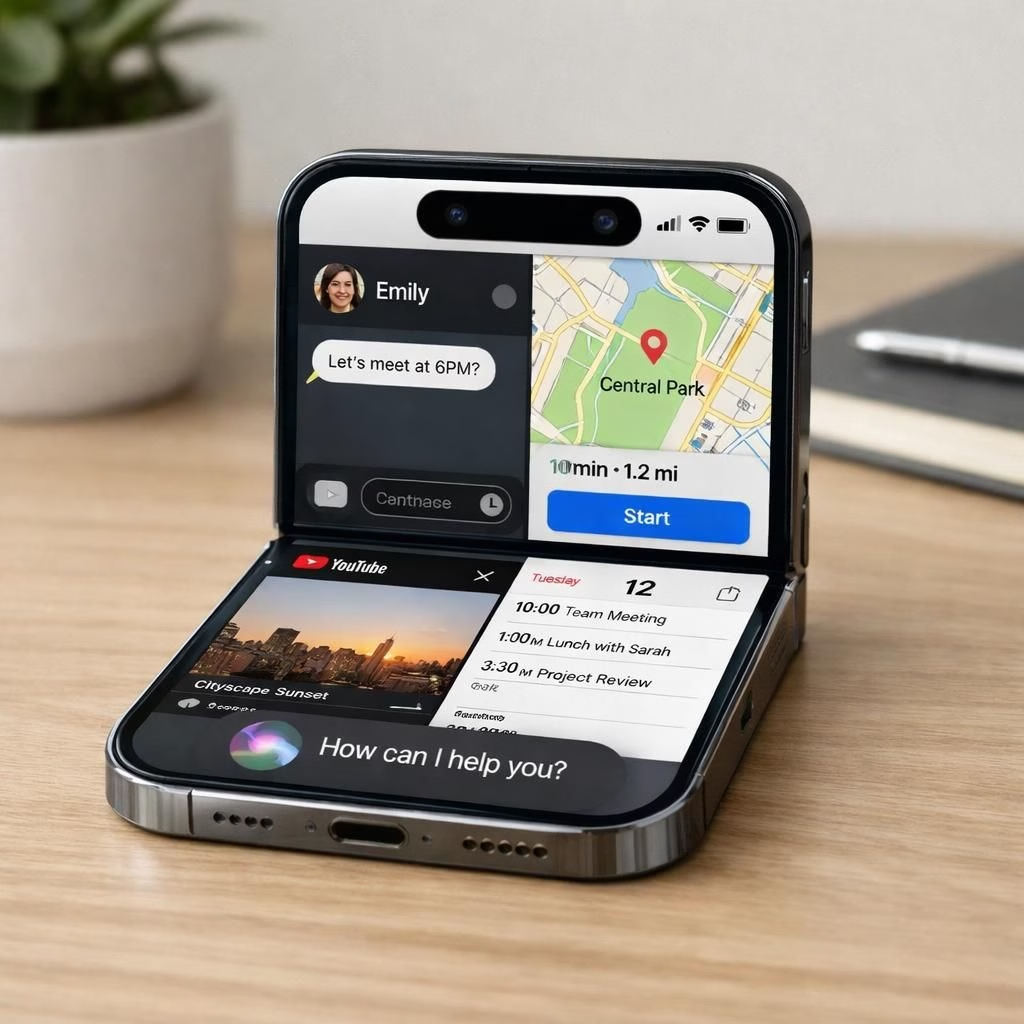
At WWDC 2026, the tech world leans in with a cautious grin as Apple readies iOS 27 and AI features that feel genuinely useful. The focus isn’t a dramatic redesign but a deliberate upgrade aimed at reliability, responsiveness, and longer battery life. A handful of AI features that truly add value could make daily tasks smoother, respecting both your time and your device’s stamina. The buzz around iOS 27 centers on a future-ready approach—especially for the foldable iPhone—where multitasking and smoother interactions become baseline expectations. In this iteration, Apple emphasizes polish over fireworks, with AI doing the heavy lifting behind the scenes so you notice fewer laggy moments and more meaningful assistant help. If the chatter holds, iOS 27 will be a quiet win: faster apps, steadier performance, and smarter suggestions—all powered by AI that aims to assist rather than clutter your screen. And yes, the AI aura around Siri is part of the package, but the goal is steady, useful enhancement rather than gimmicks dressed as magic.
iOS 27 AI: Foldable windowing and UI refinements
The foldable future gets practical treatment in iOS 27. Apple is polishing windowing to make two apps feel natural on the new foldable iPhone, with layouts designed for both the inner 7.8-inch panel and the outer 5.5-inch screen. Expect improved multitasking, smoother transitions, and interfaces that adapt to the fold without collapsing into a quirky gimmick. The Dynamic Island receives a more prominent role, acting as a quick-access hub for tasks, notifications, and ongoing actions. This isn’t just cosmetic; it’s a thoughtful rethinking of space on a larger-than-before display, aimed at reducing context switching and keeping you in a productive flow. Hardware timing suggests a September 2026 availability, aligning with the foldable iPhone’s arrival and creating a cohesive ecosystem where iOS 27 takes full advantage of the larger real estate. For developers, that means enhanced windowing APIs, smarter scene management, and more efficient resource allocation so apps feel snappy even when you’re juggling two windows side by side. In short, iOS 27 AI-friendly multitasking is moving from a novelty to a standard expectation, with the foldable design serving as the stage rather than the punchline.
AI-powered Siri and Gemini AI in iOS 27
The star of the show is the redesigned Siri, built on Gemini AI and tightly integrated with the broader AI features Apple is rolling out. Expect a more capable chat memory, letting Siri remember recent conversations to provide proactive help — for example, suggesting leaving home to beat traffic if your Apple Calendar shows an airport pickup. Apple reportedly introduces a standalone Siri chatbot app that can handle files, photos, and chats, with options to auto-delete chats and keep conversations under your control. The new Siri lives in the Dynamic Island, with a fresh animation when activated, moving from the old orb to a more immersive, contextual presence. Access to Siri is evolving too: a swipe-down gesture from the top center opens a “Search or Ask” interface that surfaces Siri suggestions, recently used apps, and your notes. The AI-powered search engine integrated into iOS 27 aims to rival other leading AI search experiences, expanding the way you discover information on-device and on the web. The update is framed as a practical enhancement: a more capable assistant that respects your time and your device’s energy budget, without turning every task into a vocal quiz.
Photos, Camera, Wallet, and Calendar: iOS 27 extends Apple’s ecosystem
Beyond AI-assisted Siri, iOS 27 brings thoughtful improvements across core apps. In Photos, look for three new editing capabilities: Extend, which generates content beyond the original frame; Enhance, which auto-tunes lighting and color; and Reframe, which shifts perspective for spatial photos. These tools aim to simplify creative tweaks while maintaining control for more advanced users. The Camera app is expected to become fully customizable, letting you choose which features appear and where they sit in the interface, with Visual Intelligence embedded directly to help read on-image data like nutrition labels or text in the scene. Apple Wallet gains practical additions such as Create a Pass, which helps convert physical passes to digital passes, and a bill-splitting feature to simplify group dining. Calendar is set for a substantial overhaul, improving how events surface on large displays and how you navigate schedules across devices. The broader iOS 27 strategy emphasizes a cohesive experience where all the usual suspects—Photos, Camera, Wallet, and Calendar—work together with smarter automation and more intuitive controls, all powered by AI where it adds value without getting in the way.
How to explore iOS 27 features today
- Update a supported iPhone to the iOS 27 beta (developers first, then public beta).
- Try the new windowing on the foldable iPhone by placing two apps side by side in different states.
- Experiment with Write With Siri and the new Quick Access prompts in Dynamic Island.
Practical tips for this launch cycle include keeping your device charged for longer sessions with use cases that leverage the new multitasking and AI-powered tools. If you’re curious about how these changes affect everyday workflows, test a mix of Photos, Camera, and Wallet tasks together to feel the holistic upgrade rather than isolated features.
As always, the rollout will be accompanied by comprehensive documentation and developer tools to help apps take advantage of windowing, Dynamic Island, and Gemini AI capabilities. The result could be a richer, more integrated Apple ecosystem where AI features enhance, rather than complicate, everyday tasks.
Have thoughts on iOS 27 AI and the foldable future? Share your perspective in the comments below. Your experiences help others understand how these changes land in real life.
Original article: Thanks to Bloomberg for the original reporting on iOS 27 and WWDC 2026. Bloomberg.