

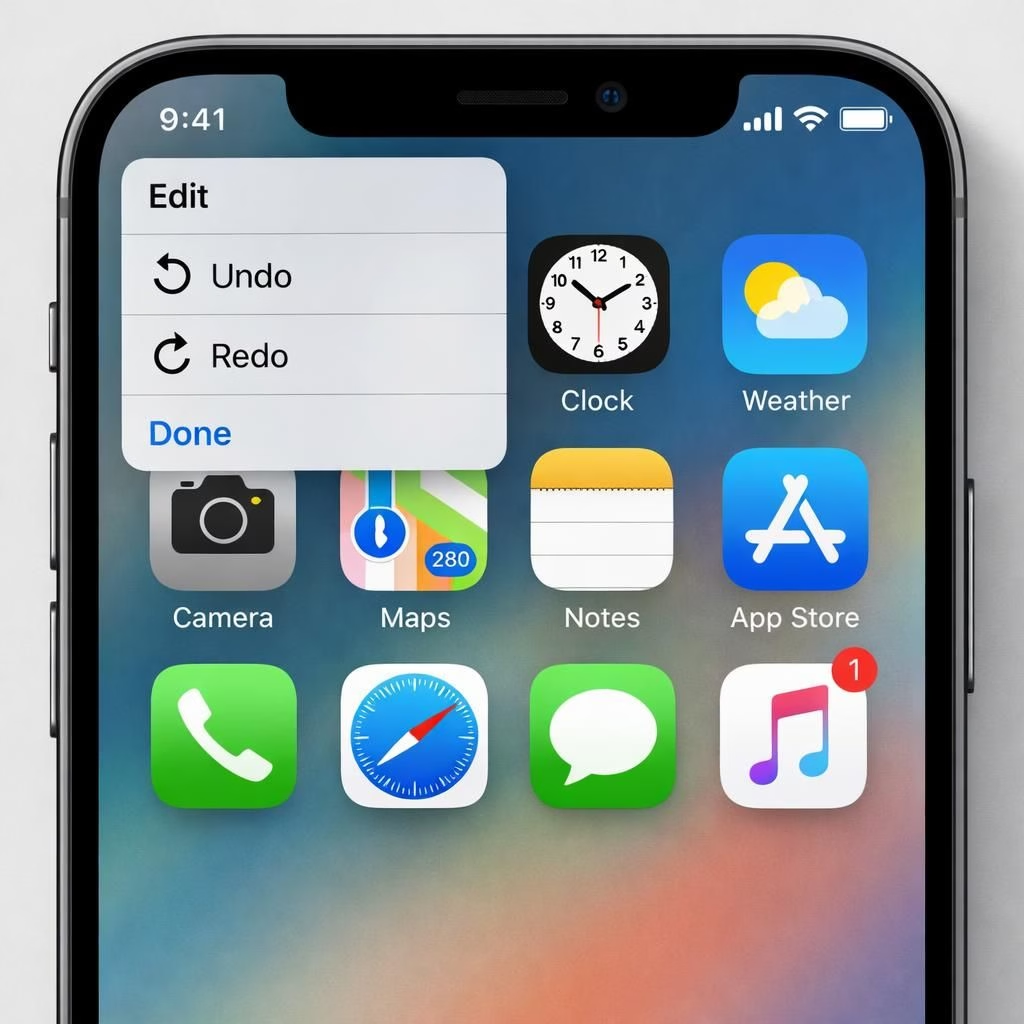
Apple fans may soon enjoy an Undo/Redo moment on their iPhone, with Bloomberg’s Mark Gurman reporting that iOS 27 could add undo and redo options to the Home Screen customization menu. The idea is to make it easier to reverse or reapply changes after a long-press on the Home Screen, rather than hoping your memory is as sharp as your widgets. In short, iOS 27 aims to turn trial-and-error into a friendly, reversible dance.
iOS 27 and the promise of Undo/Redo on the Home Screen
In the long arc of mobile design, Undo/Redo acts like duct tape for chaos — handy, unglamorous, and oddly comforting. Gurman notes that Undo and Redo would sit in the same menu that currently hosts Add Widget, Customize, Edit Wallpaper and Edit Pages. The practical upshot is simple: you can undo a change or redo a previous state with a couple of taps, not a manual reset or a reboot. If iOS 27 delivers Undo/Redo, it won’t overhaul the entire editing flow; it will sweeten the existing toolbox with a tiny, dependable shortcut. This mirrors Apple’s broader strategy for 2026: gentle improvements that feel obvious once they exist, but are easy to miss when they aren’t there.
Undo/Redo in iOS 27: Practical design notes
The design intent is clear. Apple wants the Home Screen editor to be forgiving and intuitive. The Undo/Redo in the editing bubble would be a quiet but meaningful enhancement, reducing the sting of a mistaken tap. For iOS 27 users, that means fewer headaches when tinkering with icons, widgets, and wallpaper. Undo/Redo becomes a built-in safeguard that encourages exploration rather than hesitation, a small confidence boost in a familiar rectangle of glass and icons.
Why this matters for iOS 27 users
- Less anxiety when tinkering: a reversible path to mistakes means experimentation without fear.
- Faster correction: no more redoing entire screens after a mis-tap.
- Better accessibility: a straightforward Undo/Redo for users who customize often.
- Consistent behavior: Undo/Redo would align Home Screen edits with other Apple apps that already support reversing actions.
The broader vision: Undo/Redo as part of a larger toolkit
Beyond Undo/Redo, the report hints at a dedicated Siri app and advances in Apple Intelligence. A standalone Siri app would streamline voice interactions, while Apple Intelligence would aim to make proactive suggestions and automations smarter. Taken together, these rumors sketch a cohesive strategy: small, dependable improvements that accumulate into a more confident, less fiddly iPhone experience in 2026. If you like tidy, repeatable workflows, this is the sort of trio that makes a difference over a dozen daily interactions.
Timelines and practical implications for iOS 27
Timeline-wise, iOS 27 invites Beta testing in June, with a release window in September. That cadence mirrors recent cycles and gives developers time to adjust. If Undo/Redo lands in the first wave, it should appear in the Home Screen editor as a simple add-on to the existing set of options. Users could tap Undo to return to the previous state or tap Redo to reapply the most recent undone change. The practical impact is modest, but meaningful: fewer accidental changes, quicker recoveries, and a smoother customization journey for 2026 iPhone owners.
What this means for developers and designers
From a product perspective, the smallest changes often yield the biggest payoff. Undo/Redo requires careful state management and crisp UI feedback. When a user taps Undo, the system should step back to the prior screen or arrangement; when Redo, it should re-run the undone step. These transitions must feel instantaneous and predictable, preserving a single source of truth for the Home Screen state. This is a reminder that in 2026, Apple’s strength remains polish and reliability, not merely novelty.
For everyday life, this tweak could lower the barrier to experimentation for new iPhone owners. It reassures power users who rearrange icons weekly and saves time for everyone who wants a cleaner, faster start to the day. The humor here is that Undo/Redo sounds like something out of a productivity app, but it belongs in the Home Screen where real life happens — accidentally changing wallpaper at 3 a.m. is a Friday-night tradition no longer punished by permanence.
If you’re curious about the specifics of the Bloomberg report, you’ll see that the proposal sits among other iOS 27 feature ideas, not a guaranteed feature set. The signal is clear, though: Apple is listening to how people actually use the Home Screen and wants to make it easier to recover from a mis-tap or an impulsive widget swap. The end goal remains a friendlier, more predictable iPhone in 2026.
We’d love to hear your thoughts in the comments below. Special thanks to Bloomberg for the original reporting. Original article here: Bloomberg Power On.
Practical example: using Undo/Redo in the Home Screen editor
Try this quick workflow to get comfortable with the feature: long-press to edit, then press Undo/Redo as needed to compare layouts. You can revert a widget layout, swap wallpaper, or rearrange icons without fear, and you can reapply a preferred setup with a single tap. This small loop makes experimentation faster and more forgiving for everyday users.
Frequently asked questions about iOS 27 Undo/Redo
- When is iOS 27 expected to release? Beta testing is rumored to begin in June, with a public release in September, following Apple’s usual cadence.
- Will Undo/Redo apply to all Home Screen edits? Apple hasn’t confirmed the scope yet. It’s described as part of the editor’s state-management improvements, likely focused on the Home Screen customization flow.
- How do I use Undo/Redo? In the Home Screen editor, look for the Undo/Redo option in the edit bubble. If you tap Undo, you’ll step back to the previous arrangement; tapping Redo will reapply the undone change.
- Where can I read the original Bloomberg report? See Bloomberg Power On for the reporter’s summary and links to related iOS 27 ideas.
Conclusion: takeaways and next steps
iOS 27’s proposed Undo/Redo feature could lower the friction of Home Screen customization, inviting more experimentation and faster recovery from mis-taps. If Apple confirms the rumor, you’ll see a small, reliable improvement that compounds with other 2026 refinements. Stay tuned to Bloomberg’s Power On newsletter and MacRumors’ coverage for updates, and consider testing the feature as beta builds roll out later in the year.