

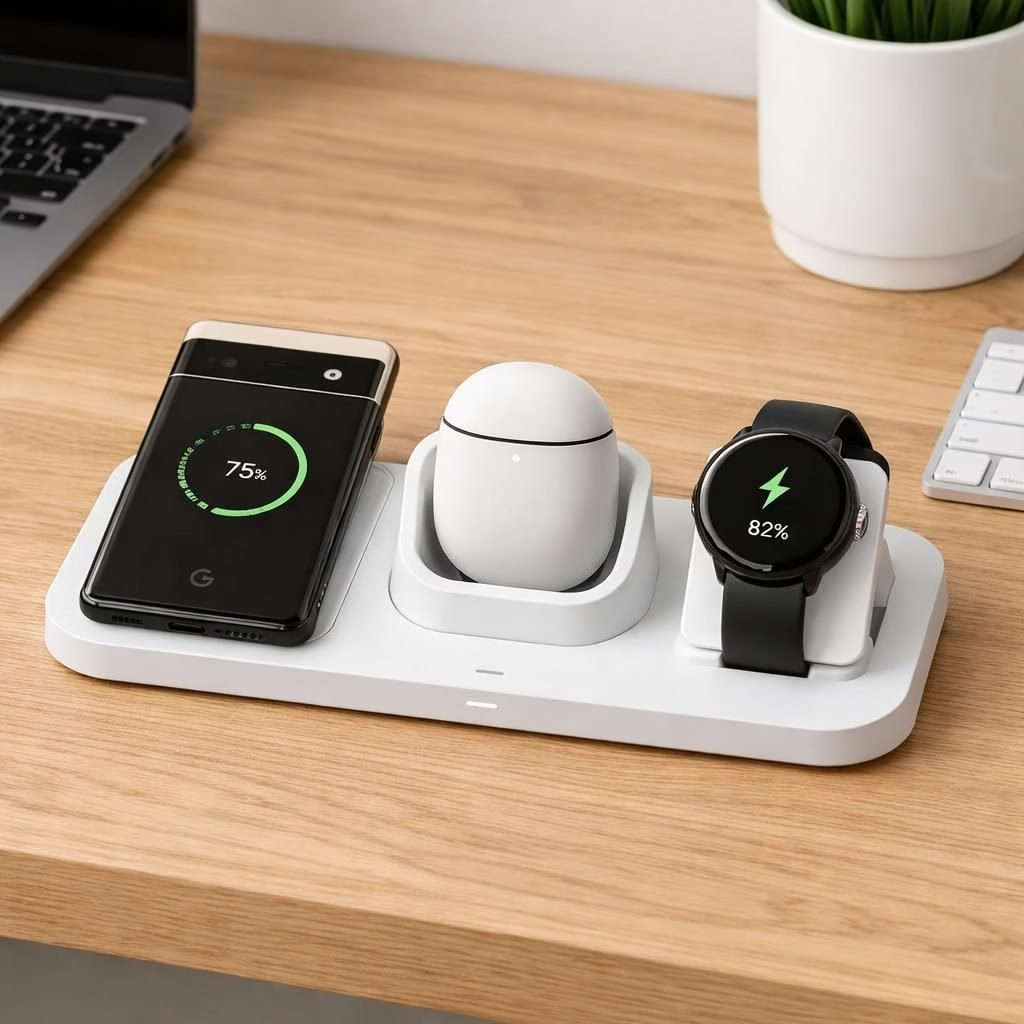
Desk tidiness just got a real upgrade as Google unveils a 3-in-1 charging dock for the Pixel lineup—a single cradle that powers a Pixel phone, Pixel Buds, and Pixel Watch 4.
Google Pixel Dock: 3-in-1 Charging for Pixel Phone, Buds, and Watch
From unboxing, the Pixel Dock signals that your desk deserves organization and quiet elegance. The dock supports Qi wireless charging for the Pixel Phone, a snug cradle for Pixel Buds, and a dedicated cradle for Pixel Watch 4. In practice, you drop the Pixel on the left, tuck the Buds in the center, and rest the Pixel Watch on the right. The phone charges wirelessly, the Buds sit in a slot that protects the case and keeps the setup tidy, and the Watch rests in a cradle that won’t nick the metal or scratch the glass. The result is a compact island of power that quiets the daily cable drama. If you like minimal setups with maximum function, this is your new go-to. The design feels calm, not flashy, and deliberately avoids the plastic vibe that can plague cheaper docks. Google clearly asked itself: can we build a hub that feels like a small upgrade to your life, not a chore to assemble?
In terms of specs, the 3-in-1 dock emphasizes efficiency over drama. It uses a central charging array with distinct channels so you won’t worry about cross-talk or misalignment. The Pixel Phone charging remains compatible with standard Qi, while the Pixel Buds land in a snug cradle that protects the case and encourages neat storage. The Pixel Watch 4 fits into a cradle that aligns the sensor array just enough to avoid accidental wakeups when you lean in to grab your keys. The result is a calm, unified charging station that respects your workspace. To many users, this is not just a gadget; it’s a reminder that good tech can simplify the day, not complicate it. And yes, the look matters—this dock is designed to blend with wood, glass, or metal desks without shouting for attention.
Pixel-Driven Convenience Meets Google-Grade Reliability
The core promise is simple: one dock, multiple devices, fewer tangles. The approach feels almost old-school in the best way—no clever tricks needed, just solid engineering. For Pixel enthusiasts, the 3-in-1 dock embodies the idea that ecosystem ergonomics matter as much as raw specs. The dock’s alignment logic, charging cadence, and protective grooves are tuned to prevent overheating during longer sessions. It’s the kind of gadget you forget you have until you realize you no longer have to chase a stubborn cable or scramble for the right charger. The result is a more productive desk, a calmer morning routine, and a foundation for smarter device hygiene. The logic is straightforward: power is a habit, and a good habit is easier to keep when the tools are friendly and predictable. If you’ve ever misplaced a charger or tangled a cable behind a monitor, you know the value of a central, tidy hub—especially when that hub is designed with Pixel devices in mind and backed by Google’s reliability ethos.
From a user’s perspective, the dock serves more than just charging. It becomes a daily ritual anchor. You place the Pixel Phone in its spot, hear a soft click of approval, slide the Pixel Buds into their cradle, and settle the Pixel Watch 4 in its cradle with a satisfying ease. It’s not just about charging; it’s about a daily cue that says: your tech life is organized, your desk breathes easier, and your energy can flow into tasks rather than cable management. The aesthetic remains understated but inviting, and the build quality feels like a small investment in ongoing productivity. This is a product that knows its audience—Pixel fans who want a practical upgrade without a lot of fuss. And yes, it has a touch of humor baked in: the dock isn’t loud about itself, but it’s quietly confident that it makes life a little simpler each day.
In 2026, the promise of a single hub aligns with a trend toward smarter workspaces. The dock supports the realities of mixed-device usage: occasional hands-free tasks, quick pickups, and a little room to breathe on the desk. If you’re worried about whether it supports fast charging or whether the Buds will align correctly, you’ll be reassured by the careful design and the clear, logical placement. The experience encourages punctuality with a twist of fun. It’s the kind of device you show friends with a smirk: yes, I have a single place for everything, and it feels almost futuristic without trying too hard to be flashy.
For those who care about maintenance, the dock is relatively easy to clean and maintain. A quick wipe down keeps smudges away, and the wireless charging surface is designed to resist grime a little better than cheaper models. The inclusion of a dedicated Buds slot reduces the risk of misplacing the case, which is a surprisingly common office hazard. The Pixel Watch 4 cradle is small but sturdy, with a gentle hold that minimizes the chance of accidental tumbles. All in all, the 3-in-1 dock offers a practical upgrade to the daily routine, pairing Google-grade reliability with a Pixel-focused design philosophy that respects your space and time. If you’ve ever wished for a desk that feels less like a knotted cord maze and more like a calm, powered station, this dock is a compelling option to consider.
To sum up, the Google Pixel Dock is more than a charging accessory. It’s a compact lifestyle tool that supports your tech habits with a friendly, no-drama approach. It’s an invitation to upgrade your workspace without overhauling it. It’s a reminder that when devices coordinate well, life feels a little smoother. And if you enjoy a touch of wit with your tech, you’ll appreciate the quiet confidence this dock brings to the table. For fans of Pixel hardware and the Google ecosystem, this is a small but meaningful step toward a cleaner, more focused day.
Original article attribution and thanks: This piece builds on the coverage provided by 9to5Google. A grateful nod to the original source for the concept and context that inspired this recap.
If you have thoughts, experiences, or questions about the Google Pixel Dock, I’d love to hear them. Please share your thoughts in the comments.
Pixel-focused setup tips
- Place the Pixel Phone on the left pad to start charging immediately after you sit down.
- Slide the Pixel Buds into the center cradle so the case rests securely.
- Drop the Pixel Watch 4 into its dedicated cradle and let the charge begin.
- Keep the desk surface clear; the hub reduces cable clutter and invites quick grabs.
FAQ
- Does the Pixel Dock support fast charging? It supports standard Qi charging for the Pixel Phone and steady, safe power for other devices, designed to minimize heat during longer sessions.
- Will the Buds cradle stay aligned? Yes. The center cradle is shaped to hold the case securely without wobble or scratching the case.
- Is the Pixel Watch 4 cradle sturdy? The cradle is compact but supports the watch firmly, reducing the chance of tumbles when you grab a nearby keychain.
- How easy is it to clean? A quick wipe keeps the surface looking fresh; the design resists smudges a bit more than cheaper alternatives.