

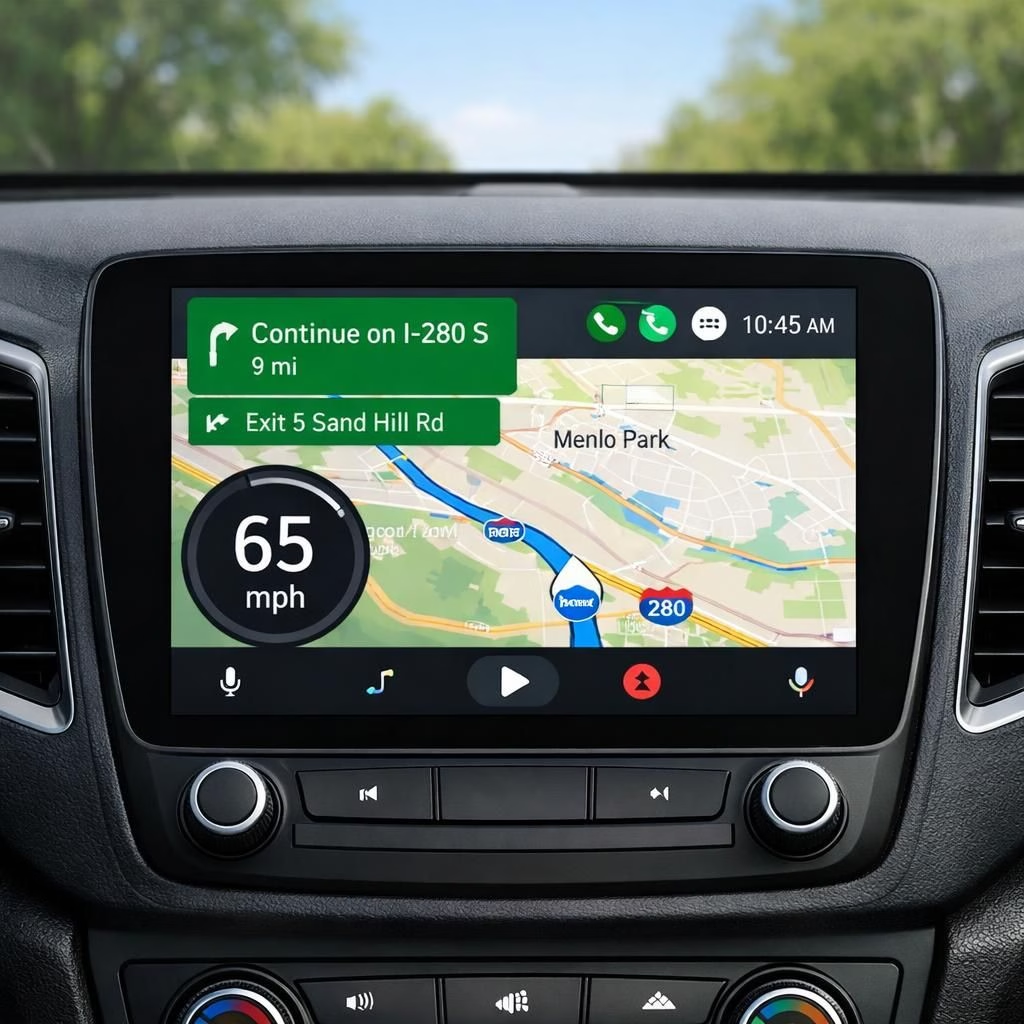
In 2026, Android Auto adds a speedometer to Google Maps on compatible dashboards. That small change reshapes how drivers read pace on the road. The rollout is careful and user-friendly, not a stunt. It’s a practical nudge toward calmer, safer commutes with fewer sudden gauge glances.
Within Google Maps, the map displays your current speed directly alongside the route, ETA, and traffic. You still see the map itself, but you gain a constant speed cue that reduces the need to glance at the cockpit cluster. The system draws speed from GPS and calibrates against the chosen unit, so you can use mph in the US or km/h elsewhere. It is a tiny upgrade with outsized practical payoff: fewer surprises, more confidence, and a smoother ride for everyone in the car.
Android Auto gains a built-in speedometer in Google Maps
To access the feature, update Android Auto and Google Maps to the latest versions. Connect your phone to the car, then open Android Auto. In Settings, navigate to Navigation and toggle Show speed. Pick your preferred unit (mph or km/h). The UI places the speed readout in a stable corner, and the map remains the hero. This is not a revolution; it is a friendly enhancement that respects your cognitive load and keeps the dashboard calm rather than chaotic.
Some early adopters may see a brief reboot or a short delay while devices sync. If you don’t see it yet, check for updates again in a day or two. It’s a gradual rollout, not a flood of firmware. The outcome is more consistency and less guesswork when you are in a new city or a tricky construction zone. In practice, you get a reliable speed readout without rummaging through menus—just glance, orient, go.
Google Maps enhancements coexist with Android Auto
Google Maps surfaces the speedometer as an unobtrusive overlay, not a separate gadget. It uses color cues to indicate safe speeds and can adapt to the map’s color scheme in dark mode. For city trips with strict limits, the readout helps you stay compliant without taking your eyes off the road. The design is clean, practical, and aligned with Maps’ aesthetic, which is good news for everyone who dislikes clashing UI.
The rollout timing varies by region and device. Some regions may require a certain OS version or app flag. Expect a slow, steady wave rather than a single big drop. The upside is a consistent experience across trips: you always know your speed at a glance, even when you are in a rental car or a borrowed dashboard. The result is less stress and more situational awareness, which most of us secretly want on long drives and busy commutes.
Android Auto users now have a clearer read on speed while keeping eyes on the road. Google Maps fans get speed readouts that appear alongside traffic and ETA data. If you test it, tell us how it changes your daily drive. The speedometer is a simple tool, but it can make a meaningful difference in ambiguous zones and unfamiliar streets. It is the kind of improvement that makes you wonder how you survived before it existed.
Special thanks to 9to5Google for the original coverage. Original article: Android Auto speedometer in Google Maps coverage by 9to5Google. Thank you for the thoughtful material that inspired this post.
Share your thoughts in the comments below to help others gauge this feature’s real-world value in 2026.
Practical steps to get started
- Update both Android Auto and Google Maps to the latest versions.
- Connect your phone to the car and open Android Auto.
- Go to Settings > Navigation and turn on Show speed.
- Choose mph or km/h as your preferred unit.
- Verify the speed readout appears in a stable corner of the map during a trip.
FAQ
-
Can I disable the speedometer?
Yes. In Android Auto Settings, under Navigation, toggle Show speed off to hide the readout.
-
Does the speed readout require cellular data?
The speed readout relies on GPS data. A data connection isn’t strictly required for the readout itself, but some nearby map data and updates may need connectivity.
-
Where exactly will the readout appear?
The speed readout appears as an overlay near the navigation information, staying out of the primary map view to minimize distraction.
-
Is this rollout available everywhere?
Availability varies by region and device. Some phones or OS versions may need a flag or-ahead update before the feature shows up.
Conclusion
The speedometer in Google Maps via Android Auto is a small, pragmatic upgrade that supports safer, more confident driving. If you try it this week, share your experience—especially in unfamiliar streets or during long commutes—as real-world feedback helps others gauge its value.
References
- Original source: Android Auto speedometer in Google Maps rollout
- Android Auto official site
- Google Maps