

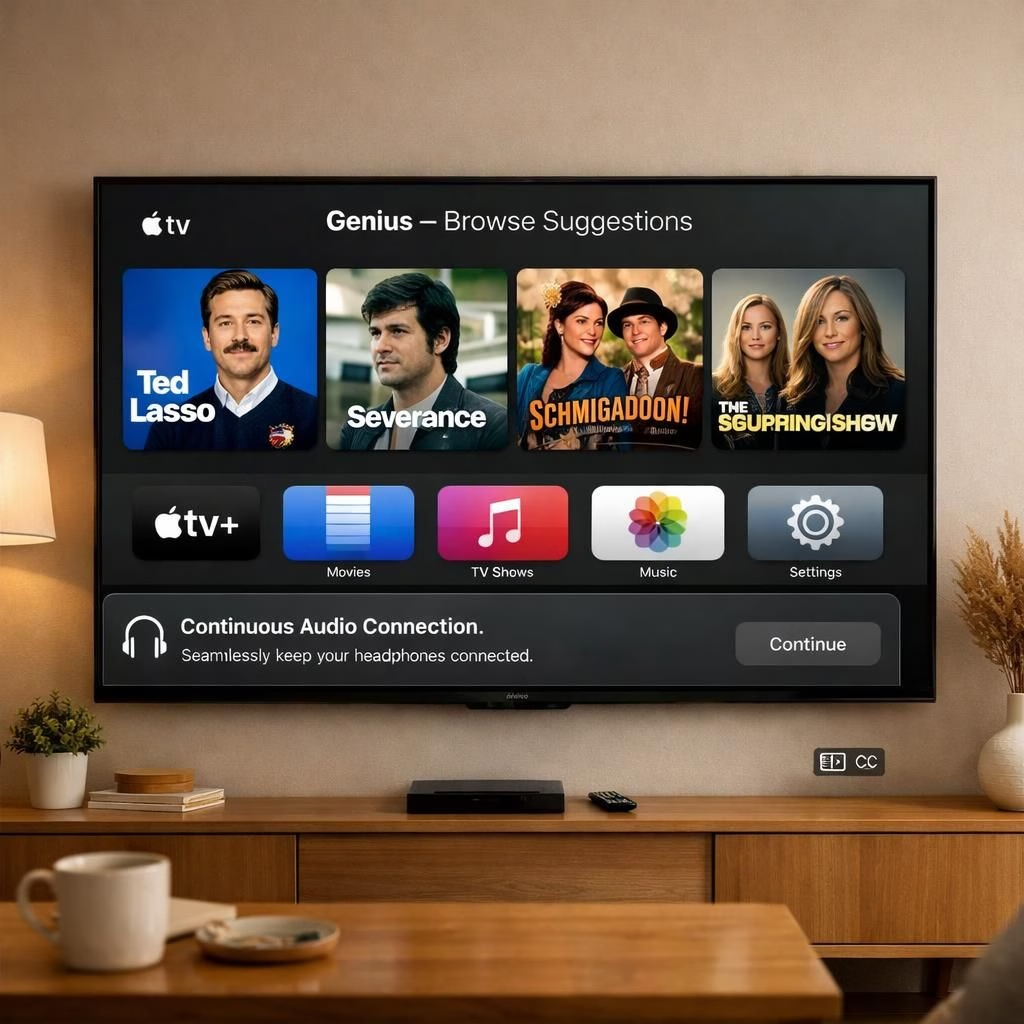
tvOS 26.4 lands on Apple TV hardware with a lighthearted bundle of improvements. This update lean s into smarter discovery, smoother audio, and friendlier subtitle tweaks. If you thought your living room was already clever, think again. The update is compatible with 4K and HD models dating back to 2015, which is a nice way of saying your couch companion can stay in the game longer than most fashion trends.
tvOS 26.4: Genius Browse lands on Apple TV
Genius Browse is the star of this release. The feature expands cross category recommendations across the Apple TV app. It crafts suggestions based on viewing habits and fresh input, improving with time. The UI surfaces categories like Bittersweet Family Dramas and Good for a Pick-Me-Up, but the list updates frequently so you won’t get stuck in a burnout loop. In short, tvOS 26.4 nudges you toward something you did not know you craved, and the app helps you find it without a map.
Genius Browse feels practical and playful at once. It works across content types, so you can discover a drama and a documentary in the same glance. The goal is to reduce aimless scrolling without turning discovery into a catalog of chores. If you enjoy a lighter TV night, this feature offers gentle prompts that keep the entertainment moving. For many users, tvOS and Apple TV become a more intuitive duo, not a reminder that time is slipping away.
Apple TV gains improved playback with tvOS 26.4
A new setting called Continuous Audio Connection appears under Settings > Video and Audio > Audio Format > HDMI Output. Apple calls it a fix for audio transitions when formats switch between Dolby Atmos and stereo. The practical upshot: less stutter and fewer glitches when you switch channels or apps mid scene. tvOS 26.4 explains that Dolby MAT helps keep things glitch-free, and older receivers may label it Atmos, but original mixes stay intact.
You can now customize subtitles directly from the video player. No need to dive into the settings every time. Adjust size, background transparency, and style while you watch. If the default looks like a courtroom, you can soften the background for a cleaner view. tvOS 26.4 makes this personalization simple on tvOS and other apps that use the built-in player.
Another change: the preinstalled iTunes Movies and iTunes TV Shows apps are removed. All content now sits in the built-in TV app. The move consolidates playback and makes it easier to locate titles regardless of the source. For users with large iTunes libraries, the transition is mostly seamless, though you may notice a slight reorganization in your home screen. tvOS and Apple TV remain aligned in moving media around to reduce clutter.
Performance and stability get a general polish. The release notes mention fixes for audio playback during format transitions and minor under the hood improvements. On newer models, some features may be limited, but the core experience remains snappy and reliable. The update also brings small quality of life boosts, like faster app launches and smoother navigation, which add up after a few evenings of binge watching.
Update guidance: To install tvOS 26.4, open Settings on your device, select System, then Software Updates, and choose Update Software. The process is straightforward and usually quick, with a brief restart and a chance to greet the new UI again. If you’ve been using your device with older HDMI setups, the new HDMI Output setting may help compatibility with a wider range of home audio gear. tvOS continues to be mindful of both new and older hardware, keeping the ecosystem largely in sync.
As with any update, the experience varies by model. Some features are clearly written for the latest hardware, while others work on earlier generations. The intention is to deliver a cohesive, improved experience without alienating longtime users. In 2026, we see this approach as a practical way to preserve compatibility while introducing smarter discovery and refined playback. The team behind tvOS 26.4 seems to have listened to real world feedback and translated it into concrete, user facing improvements for Apple TV owners.
tvOS 26.4 tips for smoother Apple TV experiences
Practical tips include using Genius Browse to jump between a drama and a documentary, and trying the new subtitle controls for a cleaner viewing window.
We’d love to hear your thoughts on this update. Have you noticed faster switches, better subtitling, or more relevant Genius Browse suggestions? Share your reflections and experiences with tvOS in the comments below.
Frequently asked questions
- What does tvOS 26.4 include? It adds Genius Browse categories, a new HDMI Output option, improved subtitles, and playback fixes.
- Which devices support this update? Apple TV 4K and Apple TV HD models dating to 2015 are supported.
- How do I customize subtitles? Use the in-player controls to adjust size, background, and style.